
|
|
#101
 11-05-2013, 12:26 PM
|
||||
|
||||
 Re: Anyone here collect Arcade Machines or Pinball?
Quote:
as for those prices, $800-$1200 is what you might play for a Japanese Candy cab but I can't believe anyone would charge that much for a mid-90s fighter. Quote:
__________________
  
|
|
#102
11-05-2013, 04:38 PM
|
||||
|
||||
|
Re: Anyone here collect Arcade Machines or Pinball?
Quote:
 The only major decision I've yet to finalize regarding the CP is whether I want to emulate N64 on it with the arcade controls (as I'm sure you may know this typically requires extra buttons) or just use the interface panel that I'll have on the front to plug in some n64 controllers and leave it strictly playable via that. (still haven't finished the front-end side of showing which CP layouts to be used yet for the n64 emulator). If I stick with the "controller only" option it should free up some space to let me either shrink the panel slightly or give a bit more room for arms and elbows and all that  Just haven't resolved yet whether anyone would actually want to play N64 games with arcade controls or not... Just haven't resolved yet whether anyone would actually want to play N64 games with arcade controls or not...
__________________
Hey all, things have really heated up lately and I'm not as available as I used to be. If I have something of yours, its still safe and sound, and I'll be looking to ship it ASAP before the next move. If you have things of mine, PLEASE PM me what I owe you and I'll send payment right away, thanks for your patience! My Collection (WIP)
My Want List Quote:
|
|
#103
11-05-2013, 04:52 PM
|
|||
|
|||
|
Re: Anyone here collect Arcade Machines or Pinball?
Quote:
I think people wouldn't complain about using arcade layouts for most N64 games, but I imagine the controller would add a good amount to the experience, for whatever my thoughts on the subject are worth. Also, don't sleep on the DiveKick layout option! I've been wanting to take on something like this for years, but that game cemented my need. Jamming on those oversized buttons is the best way to settle all future disputes.
|
|
#104
11-06-2013, 10:49 AM
|
||||
|
||||
|
Re: Anyone here collect Arcade Machines or Pinball?
So I managed to pick up a jamma machine for $206 After I figure out how to get it here...
It has a coin op that isn't hooked up so I need to know how to do that I also need a new jamma card as the current one is http://www.twobits.com/60/ I plan to install something more fun like a brawler or fighter The last 2 issues though might be harder First the screen has on and off blurring issues, I assume a loose cable The second is that it was built with a three stick set up, I'm not sure if it better to leave one set covered or get a new plate and install a 4th stick and buttons eBay link http://bit.ly/172nQ4H Also I know nothing about jamma boards and this one has a vertical alignment, would this mean the monitor is locked to vertical cards or can I just put a horizontal card in adjust something to play properly?
__________________
http://cloud.collectorz.com/LadyLarunai/games/ Last edited by kittychloe; 11-06-2013 at 12:16 PM.
|
|
#105
11-06-2013, 02:59 PM
|
|||||
|
|||||
|
Re: Anyone here collect Arcade Machines or Pinball?
Quote:
For instance I'm currently building a Fit It Felix Jr cabinet that will also be a MAME cabinet, Fix it Felix Jr has a 4-way ball top, 2 action buttons and 2 start buttons as well as a Vertical 19" CRT Arcade monitor, so that is 100% of what the controls will be, nothing extra, nothing more. When I put games into MAME I'm only loading on games that work within that control scheme (eg: Donkey Kong, Galaxian, Pac Man, etc.) Basically ONLY games designed for a vertical monitor, 2 or 4 way joystick, 1 player at a time, and 0-2 action buttons. It might seem limiting but there are still 100s of classic games that fit within that setup, and the experience of playing them will still be very close if not exactly like playing them on an original, dedicated, machine. As for the N64 ports... personally, I would avoid adding ports for normal controllers, I don't see people wanting to stand up in front of the machine holding a controller playing, especially when they could just as easily be playing on a larger TV while sitting on a comfy couch just a short distance away. I guess I don't really get the idea of playing console style games on an arcade cabinet. Quote:
The "coin door" is the door that holds all of the parts related to accepting currency. The "coin slot" is where you put your money, it rolls down a "coin chute" and drops into the "coin mechanism" (or "coin mech") which is what validates whether the coin will drop past the "coin switch" into the "coin box" or get rejected into the "coin return" So I'm suspecting that the coin switch isn't hooked up... that's super easy, it's just a ground wire and a signal wire, just like any button that the player uses on the control panel. For home use this probably isn't even necessary as most games can be setup for "free play" so no coins needed. Quote:
"JAMMA" stands for "Japanese Arcade Machine Manufacturers Association" and it's basically just the name of the connector that plugs into the PCB ("Printed Circuit Board" aka the "game board"/brains/etc.) The connector is just a standard shape and pin layout and covers "everything" the PCB needs, so it's just 1 connector 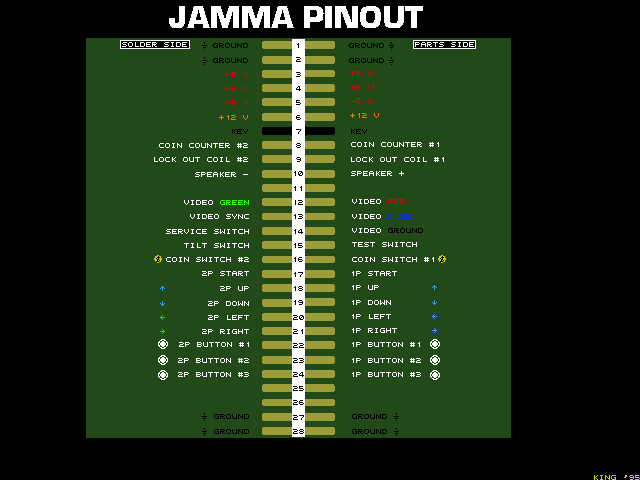 This came about because early on every game would use different style connectors so you had to re-wire the whole machine if you wanted to put a different game in it... with JAMMA all the arcade companies got together and agreed on a standard way to do things so that you could easily swap games. Because it came about in the mid-80s there are Some draw backs due to short-slightness: 1. it only supports up to 1 speaker (aka Mono audio) 2. it only supports up to 2 players 3. it only supports up to 3 action buttons per player 4. it doesn't support light guns or steering wheels or other non-standard controls) Because of this games that require more buttons or more speakers or other style controls will often have extra connectors IN ADDITION to the JAMMA connector to handle that stuff. So, for instance Most 6 button fighters use an extra connector called a "JAMMA+" connector or a "Kick Harness" which adds the 6 extra kick buttons necessary for both players. The best setup is to buy a real arcade JAMMA PCB and just plug it in and enjoy it... they do make "JAMMA Switchers" for people who want to run multiple JAMMA boards on a single cabinet without having to swap them out all the time. If you do decide to go the MAME route, then I would recommend buying a J-PAC and hooking it up to a PC running HypeSpin as your interface. Quote:
I cap the monitor on everyone of my arcade machines "whether they need it or not"... if it's more than 10 or 15 years old, it's probably due. If all of this seems too much for you there are a number of people who do CRT Chassis rebuilds and repairs for around $75-$150 depending on the monitor that that usually includes all parts and return shipping. A quick search turned this up for Australia: http://www.jomac.net.au/mon.htm Quote:
Generally rotating the monitor is pretty simple but it varies from cabinet to cabinet. You'll need to take the glass off in front of the monitor, and there are probably 4 big bolts holding the monitor frame to the cabinet... unbolt these, pull the monitor out, rotate it, and put it back in. get someone to help you though... those monitors are heavy as hell.
__________________
Last edited by twistedsymphony; 11-06-2013 at 03:08 PM.
|
|
#106
11-06-2013, 05:02 PM
|
|||||||
|
|||||||
|
Re: Anyone here collect Arcade Machines or Pinball?
Quote:
 Quote:
The cabinet is going into a store so I will need to hook it up Quote:
60 in 1 will be removed shortly after fixing the screen Quote:
Something else I knew.. Googled it just after I won the machine  Quote:
I would prefer to just dedicate the machine to one game like TMNT or street fighter ect Quote:
I've been planing to learn to solder Quote:
Not sure if you looked at the eBay link but I'm guessing from the build purpose I will need a jamma+ to be able to just stick in a fighting game card Thanks for the help if I run into trouble I will come back (probably when its time to reattach something I dislodged)
__________________
http://cloud.collectorz.com/LadyLarunai/games/
|
|
#107
11-06-2013, 05:08 PM
|
||||
|
||||
|
Re: Anyone here collect Arcade Machines or Pinball?
Before putting the machine "in route" at at store I'd check local laws... I don't know about your region but in the US different states have different laws and taxes regarding the use of coin-op games.
If you're going to set this up with Street Fighter or TMNT then I would suggest leaving it with 2 player controls. I know TMNT can be reprogrammed for 2 players or 4 players but not for 3, and I believe it requires a coin slot for each player since there are no start buttons on TMNT
__________________
|
|
#108
11-06-2013, 05:29 PM
|
||||
|
||||
|
Re: Anyone here collect Arcade Machines or Pinball?
Hmm, I just factor the earning into the business earning at the end of the week lol, I do have a spare coin mech sitting around though, maybe a game that needs a start button is best lol
__________________
http://cloud.collectorz.com/LadyLarunai/games/
|
|
#109
11-06-2013, 09:43 PM
|
||||
|
||||
|
Re: Anyone here collect Arcade Machines or Pinball?
Quote:
Killer Instinct PCBs tend to be expensive (~$300 USD) but I see older Soul Calibur/Tekken PCBs for under $100 all the time, no idea the going rate for SF games though. Also FYI you can use PCBs from any country... the monitor signal and voltage input from the power supply is all the same for arcade machines no matter where in the world you are. ... there is no NTSC/PAL in the arcade world
__________________
Last edited by twistedsymphony; 11-06-2013 at 09:46 PM.
|
|
#110
11-07-2013, 01:59 AM
|
||||
|
||||
|
Re: Anyone here collect Arcade Machines or Pinball?
Soul calibur is tempting
__________________
http://cloud.collectorz.com/LadyLarunai/games/
|
 |
| Bookmarks |
|
|


 NH
NH


 Act/Nsw


 Linear Mode

